Source: Pexels · free to use, no credit required
Japan's arrival paperwork is now one QR code on your phone — but only eight terminals in the country have the machine that turns it into a single stop. Everywhere else you still queue twice. Here is what to register before you fly, and the details that decide whether the fast lane is open to you.
1What it replaces
Two forms used to be handed out on the plane: the foreigner's arrival record, and the customs declaration for personal effects and unaccompanied baggage. Visit Japan Web, run by the government's Digital Agency, registers both online and hands you a single 2D code. Since 25 January 2024 the immigration and customs codes have been one code rather than two, and the stand-alone Customs Declaration App stopped working the same day.
It is free, it is not compulsory — the paper forms still exist — and the fast lane is only for people who used it, because the joint kiosk reads a Visit Japan Web code and nothing else. There is no app. That absence has produced a small industry of fake “Visit Japan Web” apps, which the Digital Agency warned about in 2023; the service is a website, and the only app-like thing on your phone is an offline copy the site itself installs on your home screen.
One more code comes out of the same account, for shopping: the tax-free code. It is separate from the arrival code, and the rules around it change on 1 November 2026 — see the tax-free guide before you plan a shopping day around it.
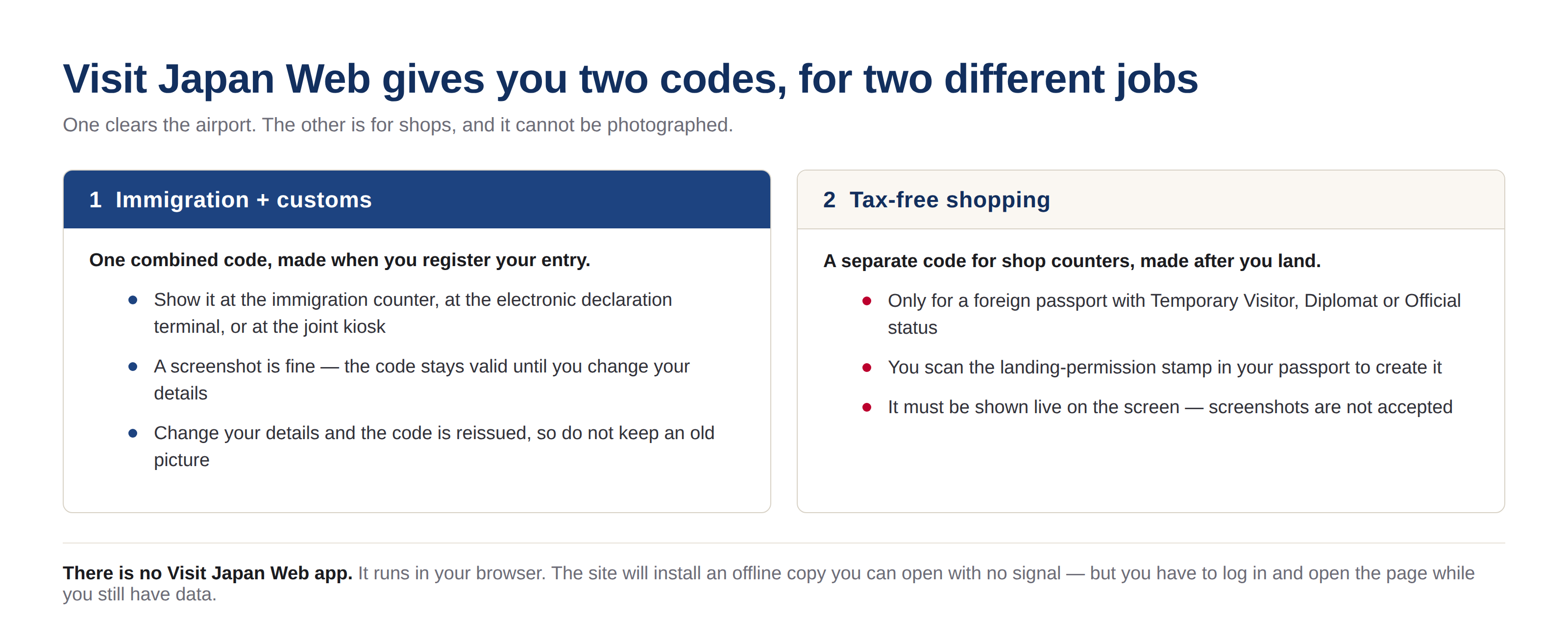
Illustration: Japan Trip Zero
2What to have in front of you
Ten minutes with the passport to hand, and one thing you must not skip: the screen that asks for the emailed confirmation code has to stay open while you fetch it. Close it, and the code is void and you start again from the first page. The official manual runs to 150 pages because it is a manual; the work itself is this:
| Item | What the site wants | The detail that catches people |
|---|---|---|
| Passport | Number, name in capitals, expiry date | The camera reads the data page. If it fails twice, type it in. Under six months of validity left raises a warning before you even fly. |
| Email and password | 10 characters or more, with upper case, lower case, a number and a symbol — Ab1234567+ works | The confirmation code arrives by email. Keep the page open while you wait for it. |
| Flight | Airline, flight number, scheduled arrival date | The number field takes digits only — MM926 is entered as 926. |
| First night's bed | Hotel name, address, phone number | Only the first night. Enter the postcode and the English address fills itself. |
| Family travelling with you | Passport details for each person | Up to 10 people, and only those who go through immigration with you — spouse and direct relatives. Friends register separately. |
Then you register the entry itself: the flight, where you are sleeping, and the arrival procedures page. That page is the one that matters at the airport, and it holds three things — a short health question, your arrival record, and your customs declaration. Press it once and the code below is what the officer or the machine will read.

Source: Digital Agency, Government of Japan · official usage guide, English screens
3The eight terminals where it is one stop
The joint kiosk is the whole point of the system: one machine that hands the same set of details to immigration and to customs at once. Japan Customs publishes where it exists and when it is open, and the list is shorter than the marketing suggests.
| Terminal | Joint kiosk since | Kiosk hours |
|---|---|---|
| Kansai T1 | 1 April 2025 | 08:00–22:00 |
| Kansai T2 | 1 April 2025 | 09:00–21:00 |
| Haneda T2 | 1 April 2025 | 04:30–23:30 |
| Haneda T3 | 11 April 2025 | 24 hours |
| Narita T1 | 24 September 2026 | 07:00–21:30 |
| Narita T2 | 24 September 2026 | 07:00–21:30 |
| Narita T3 | 7 April 2025 | 07:00–21:30 |
| Fukuoka | 1 December 2025 | 07:00–21:00 |
Two things follow from that table. Narita's Terminals 1 and 2 only joined on 24 September 2026 — any guide written before that told you Narita had a kiosk only in Terminal 3, and that is now out of date. And three airports with heavy tourist traffic have no kiosk at all: New Chitose, Chubu and Naha. There you get the second-best version, the electronic declaration terminal and gate in the baggage hall, which is what the joint kiosk was built on. Immigration stays a normal counter queue.
Where the declaration terminal exists, use it while you are standing around waiting for your bag: at Haneda, Fukuoka and Naha the terminal is in the baggage hall itself, so the customs half of the arrival is done and dusted before your suitcase arrives.
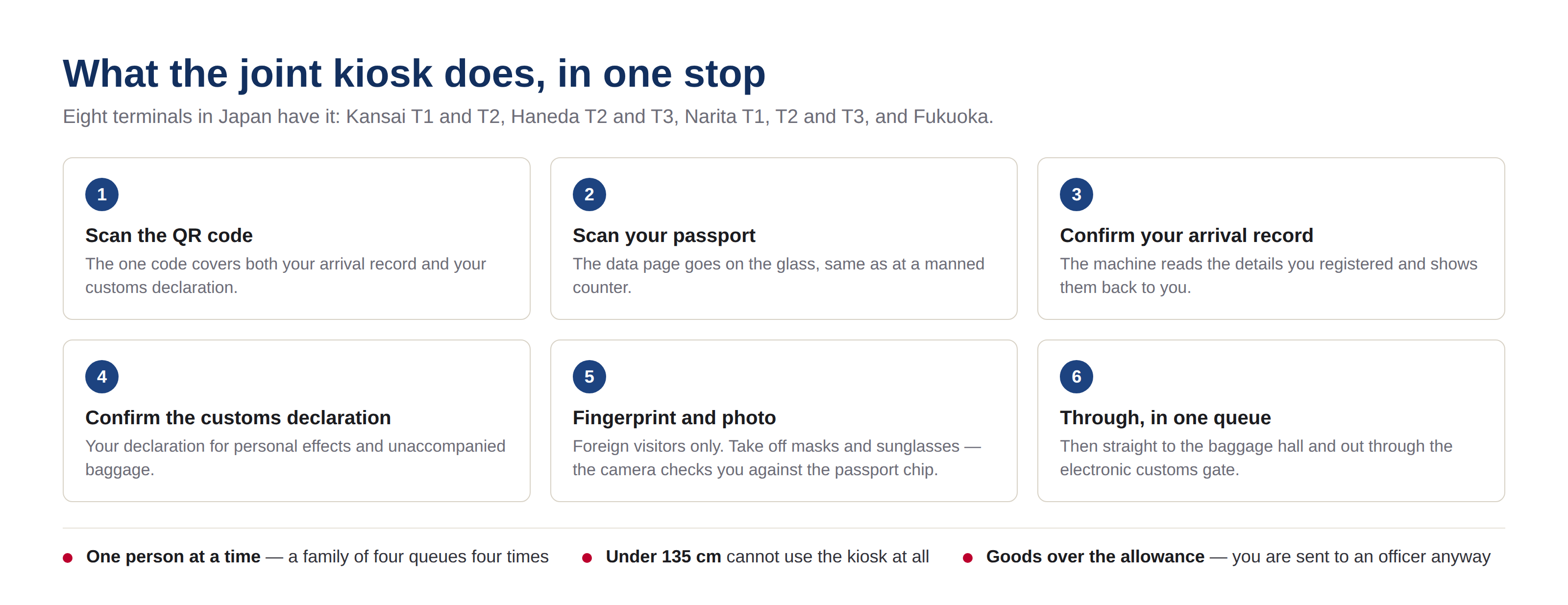
Illustration: Japan Trip Zero
4The four rules that decide whether you get through
- 135 cm. Anyone shorter than 135 cm cannot use the joint kiosk at all, whatever is on your phone. Families with small children use the manned counters. The customs e-gate is kinder: children under 100 cm go through it with the family.
- One person at a time. Every traveller passes the machine individually, including a family whose codes all sit in one account. Register the group on one phone — then expect four turns at the machine.
- The customs gate wants a chipped passport. It checks your face against the image stored in the passport's IC chip. A passport without a chip can still use Visit Japan Web, but the gate will not open, so you join the officer queue.
- Uncover your face. The camera compares you with the passport chip at the kiosk and again at the gate. Masks and sunglasses off, and walk through facing forward.
5What I would do
- Register the night before, at home, on wifi. Not in the arrivals hall: the confirmation screen has to stay open while you fetch the emailed code, and the passport scan is the slow part.
- Screenshot the arrival code as a backup — but keep the live page too. Editing anything reissues the code, so a screenshot from last month is a dead picture. The tax-free code cannot be screenshotted at all.
- Buy data before you fly. The offline copy is genuinely useful, but only for pages you opened while online.
- Check your terminal before you fly. Land at Narita T1 at 22:30 and the kiosk closed at 21:30 — you are in the queue with everyone else.
- Ignore the app store. There is no Visit Japan Web app. Anyone selling you one is not selling you the government's service.

Source: Digital Agency, Government of Japan · official usage guide, English screens
| For the arrival | Why ahead | Check tickets |
|---|---|---|
| Japan eSIM | The code lives on your phone; you want data the moment you leave aeroplane mode | Check prices Check prices |
| Private airport transfer | Door to hotel, and the only sane option if the kiosk and the last train have both closed | Check prices |
| Keisei Skyliner (Narita → Ueno) | Cheaper as an advance voucher, with no ticket-office queue after a long flight | Check prices |
Keep reading
- Japan's tax-free shopping changes on 1 November 2026 — the refund desk is now at the airport you are standing in.
- Narita vs Haneda vs Kansai: which airport lands you closest to your hotel — the times and fares, door to door.
- Suica, PASMO or ICOCA: which IC card to actually buy in 2026 — buy it before you join the airport queue.
- All guides to Japan — the full index.
Sources
- Digital Agency — Visit Japan Web: how to use, with the English screens reproduced above
- Digital Agency — Visit Japan Web Instruction Manual, version 3.15 (June 2026)
- Japan Customs — joint kiosk: applicable airports and terminals, start dates and operating hours
- Japan Customs — joint kiosk: how the procedure works, and what it needs from your passport
- Japan Customs — electronic declaration gates at seven airports